
I enjoy playing with AI-based image generators, which are a source of constant surprises. Sometimes someone will come up with a clever concept and briefly everyone is enchanted with it. For me, the enchantement is “how did they do that?” and the subsequent pleasure of finding out.
This one is a wowser. Here’s how the trick is done. First off, I created a plausible base image to work from. The prompt, in this case, was:
a detailed cinematic image of a samurai walking down a misty trail, wearing a conical straw hat, he has his katana out of the scabbard. behind him on the trail are several crumpled bodies. one is still alive, and has an expression of pain and horror in its face. he has his back to the trail and is walking toward the camera.
detailed, realistic. black and white in the style of akira kurosawa.

Well, the black and white version is better, but no biggie. Load it into photoshop and draw a camera-track on it:
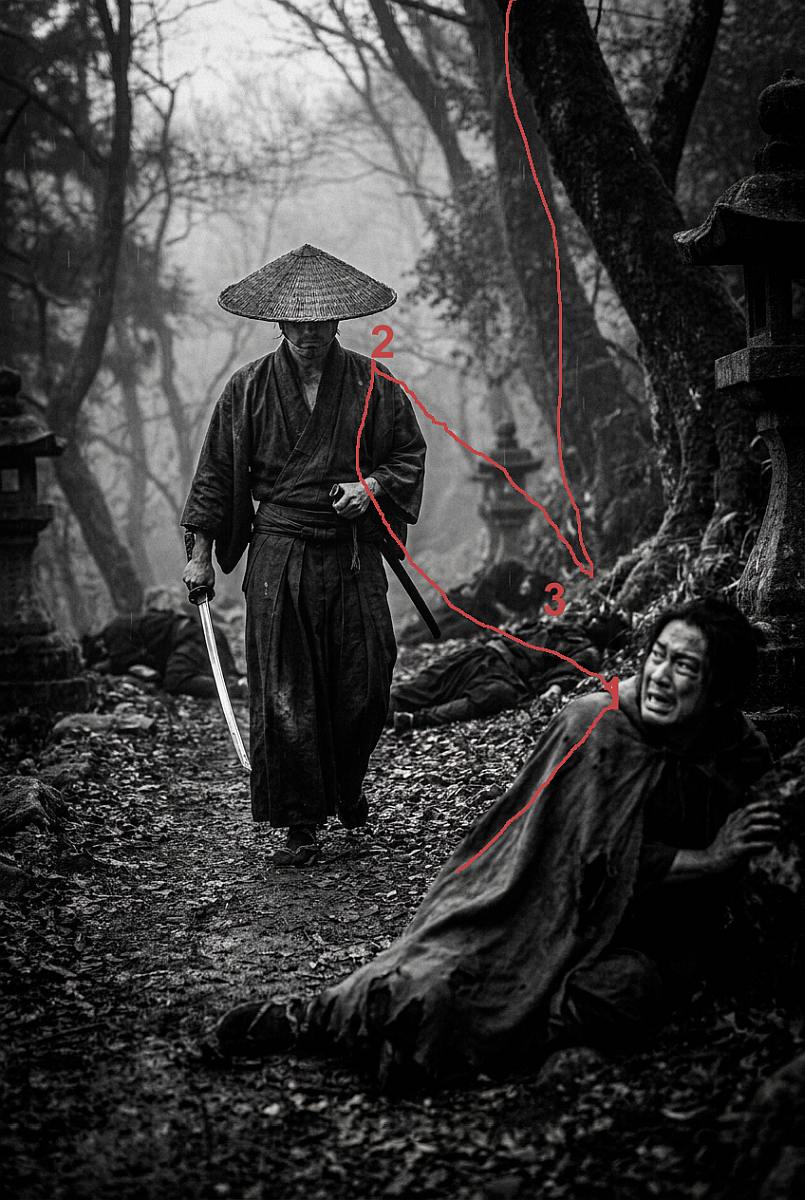
That’s basically all the set-up. The rest is pure fun. Now, the prompt for the video, run through seedance2.5 to render it, results in:
Right, what does the prompt do? It tells the AI to follow the track that I drew on the image.
Image-to-video, 30 seconds, ONE continuous flying camera shot, no cuts. FIRST FRAME: the video starts as an EXACT copy of @Image1 —a frame from a black and white samurai movie, includingthe red drawn line and numbers “1” “2” and “3”. Within the first half second the red markings dissolve completely and must NEVER reappear. CONCEPT — FROZEN TIME: as the markings vanish, the photograph gains full three-dimensional depth, but TIME STAYS COMPLETELY FROZEN. Every person,vehicle, bird and particle is locked mid-motion like a vast sculpture: swirling mist hanging solid in the air,walking man frozen in mid-step. NOTHING moves except the camera, which drifts through the frozen moment slowly anddeliberately, inspecting details and faces at close range.
Basically, the camera is invited to confabulate detail into the image, to let it fly around and see things it otherwise would not see. But the image reference powerfully anchors it to the original scene.
KEEP THE ORIGINAL BLACK-AND-WHITE LOOK: monochrome tonality, fine photograin, overcast 1930s daylight — a living archival photograph. CAMERA PATH: the red line is the flight trajectory — enter at marker “1”, go to marker “2” and end at marker “3” . 00–01s: Static frame identical to the input; red markings dissolve. Dustmotes hang motionless in the air — the first hint that time is frozen. 01–04s: The camera dives to marker 1: macro pass over the scared man, the mist in the air is frozen like stone 04–08s: The camera rises to the samurai’s face frozen mid-motion: extreme close-up — stubble, creased eyes, a wisp of frozen breath vapor at his lips. Slow half-orbit around his head, focus racking across his face. 08–12s: Glide to the the dead and wounded on the trail. Close orbit — their clothes, their slack expression, unfocused eyes. 12–16s: The camera sweeps down the misty trail, swirling around the lens in sharp macro focus.
There are some really cool versions of this on instagram, done by people who spent the money for the high-end rendering pipelines. Seedance isn’t free, either, but it’s not particularly expensive. Some of the instagram videos are elaborate live-action scenes derived from famous paintings (e.g.: the girl with the pearl earring talking to Vermeer) and the woman with the ermine nose-booping it as she gets it out of its cage.
All of this is going to contribute to additional moral panics, when people realize that “OMG someone could make fake video!” Well, yes, and it’s going to be obviously fake, if only because it looks too good.
Sorry, but I can’t get past the basics that you specifically asked for B&W and got color, and that you specified that the wounded man should be behind the samurai, but he winds up in the foreground. The fact that you were able to make something you found useful or entertaining from what it gave you is beside the point. It didn’t follow basic instructions for step one.
jimf – it gets worse.
I had a fascinating experience last year. My wife was making something for a friend, and trying to wrangle a quick image out of an AI as part of it. The image description went something like this:
Night time, full moon over a wintry/Christmassy village. Santa’s sleigh is being towed through the air. The sleigh is on the left of the image, to the left of the centrally placed full moon. The sleigh is piled with presents, but there’s nobody in it. To the right, at the other end of the traces and on the right of the centrally placed moon, is a massive black dragon. It is being ridden by a white-haired, pale skinned witch in a long hooded cloak with the hood up.
Now, you should be able to picture that.
She got an image. The sleigh was there, the snowy night over the village was there, the full moon was there, the dragon and its rider were there and looked great. But:
– the moon was up high on the right
– the dragon wasn’t really connected to the sleigh
– the entire thing was back to front – the visual logic was the dragon was towing the sleigh to the left
No problem, just instruct the AI to draw the same thing the other way round with the moon in the middle. Nope – moon went to the middle but the dragon kept flying the wrong way.
I asked it which way the dragon was flying. It said “to the right”, in defiance of what was in front of my eyes. I asked it to imagine a line starting at the dragon’s eye and passing through its nose, and to extend the line to the edge of the drawing, and to report which side of the drawing this line intersected. It bashfully reported that the line intersected on the left, and that yes, this meant the dragon was flying to the left.
This has often been my experience of interacting with AI. I start with a task. It fails at that task almost immediately. I then go down a rabbit hole of pursuing WHY it failed, and specifically why it persists in lying to me about the fact it failed, claiming it’s done the right thing, then admitting it’s not, then admitting it CAN’T even though I’m not asking for anything much more complicated than what it’s ALREADY DONE, just with ostensibly very minor tweaks.
I find its uselessness fascinating. The only downside is, when it fails, there’s nobody real to stab.
Last term I wanted to make quick and cheap kumihimo discs for school: tell the AI to make a cirle, mark the middle, and space the numbers 1-12 evenly around the circle. It forgot 8 and 10. So far I’m not very worried about AI replacing me
I had what passes for a success with AI. I did the directions one line at a time.
1 The Statue of Liberty kneeling by her pedestal.
2 Her broken crown and extinguished torch on the ground.
3 Remove the crown from her head. (Last I checked AI got the right number of R’s in strawberry.)
4 Change picture to a drawing
All in all i think it turned out well, It will be on my T-shirt for the next no kings.
Sometimes it works, sometimes it doesn’t, a lot of the time it falls somewhere in between the two. When it doesn’t do exactly what you want, you may be able to persuade it by trying again or rephrasing things, or you may not. Whether that level of performance is acceptable depends on a lot of things – how important the task is, how important it is that it be done exactly per specification, whether you’re paying for failures and retries on a per-token basis, how much patience and / or time you have available… I get the impression that Marcus is not particularly short of patience, time, or money, and isn’t trying to do stuff that’s super important or has to be just right, so has a fairly high tolerance for messing around and stuff that’s not exactly as requested. YMMV, and it’s obviously a different matter if you’re trying to use it for work.
Where things get really sticky is when your boss uses it to come up with some bullshit presentation and is happy with that, and so decides that (a) you should be using it for the month-end financial reports and (b) you should be able to do them in a fraction of the time now. Arguably that’s more a boss problem than a tech problem, but there’s a lot of it going about.
Whether people are willing to pay enough for that level of performance to justify the trillions of dollars of capex that’s being spent is another question again, and I suspect the answer to that one is going to turn out to be “no”.