More Civil Time Geekiness

The was a message today in a C++-related e-mail list saying that the October meeting of the General Conference on Weights and Measures (CGPM) will consider getting rid of leap seconds and adding a leap hour every few thousand years.

At present, because of the Earth’s variable rotation around its axis, atomic clocks (which UTC is based on) are getting ahead of astronomical observations.  To keep the two more or less in sync, one second is added to or subtracted from UTC every so often.  In principle, this can happen to the last minute of June or December in any given year; but in practice, it happens much less often.  Twenty-eight leap seconds have been added since December of 1971; but there hasn’t been one since December of 2016; and so far, there has never been a negative leap second.

Unfortunately, there’s lots of software out there that pays no attention to this; and leap seconds (23:59:60 should be considered a valid time) have caused outages even though it’s been happening for over fifty years; and it looks like we might have a negative leap second before long (23:59:58 should jump directly to 00:00:00 on some date known in advance) which could cause even more craziness.

We’ll see what CGPM decide to do …

More Time Zone Silliness

I’ve been a civil time geek for a while, and I follow an e-mail list relating to IANA’s tz database.  It looks like the tz-art.html file in the next release will contain a link to Wednesday’s xkcd. 😎

There’s been a lot of discussion on the list about the proposed “permanent daylight saving time” law that just passed in the U.S. House of Representatives.  It sounds simple:  the proposed law doesn’t change the time zone names; it just changes the offsets from UTC and makes them permanent.  For example, “eastern standard time” would become UTC−4:00 year-round.  But states would be allowed to opt out, so for example, Hawaii could keep its UTC−10:00.

So what if Arizona decides to keep its UTC−7:00 year-round but doesn’t call it Pacific standard time?  Mountain standard time would mean different things in tz’s time zones, America/Phoenix (Arizona except Navajo Nation) and America/Denver (generic mountain time).

Furthermore, it turns out that there’s lots of legacy code out there that hard-codes offsets to abbreviations like “MST”.  All that code happens to work at present; but it’s been wrong for decades and so will likely stay wrong.

I’ll bring the popcorn. 😎

Social Media and Me

I’ve never used social media*, so I’ve never been affected in any way by the problems Facebook, Xitter, etc.  Am I missing something?

I remember PZ trying to choose between Mastodon and BlueSky, and Mike the Mad Biologist recently mentioned a couple of things that he likes about BlueSky.  Should I try out one of those?  What will I be able to do that I can’t do now?


*OK, I guess blogs are a kind of social media; but aside from that…

I did create a LinkedIn account near its beginning, but I wound up never using it for anything.

Time Zones in C++

I think I have my timezone class ready for prime time, so I should be just about ready to finish the larger civil time library (which I put on hold because a couple of the classes depend on timezone).

But as I write this, I remember that there’s one thing I haven’t tested yet:  the option of reading TZ and TZ_ROOT environment variables using std::getenv() before the timezone class gets used for anything.  I do that magically with some tricky code that has the odor of the poltergeist anti-pattern; so I need to create the TZ and TZ_ROOT environment variables on my Windows box and make sure that that works.  I don’t see any reason why it won’t, so I’ll say tentatively that I’m done.

Questions for Mac Users

I’ve been slow to finish testing my C++ time zone code because I’ve had other things to do; but I think I have it ready for prime time.

But now, in the spirit of the analysis paralysis anti-pattern 😎 (I’m having fun in my retirement, don’tcha know), I’ve decided that I’d like to make it magically portable to the Mac if I can.

1.  Does the Mac have the Zoneinfo data somewhere?

2.  Do you have POSIX-style environment variables (possibly called TZ_ROOT and TZ) for
  a.  the directory where the Zoneinfo compiled binaries are found, and/or
  a.  your local time zone?

If Macs are at all Linux-like except for having the environment variables, TZ_ROOT could be /usr/share/zoneinfo”; and TZ could be localtime or, in the U.S. central time zone for example, either America/Chicago or CST6CDT,M3.2.0,M11.1.0”.

And for those doing C++ work with some version of GCC,

3.  is there some macro or other predefined identifier that says we’re compiling for a Mac rather than some other POSIX-like O/S?

I could probably go to an Apple store, fire up a Korn (or other) shell, and find out what I need for myself; but I’m hoping that there’s somebody reading this blog who already knows the answers off the top of their head.

Thanks.

Update:  thanks to robert79 for some good information about Macs.

It looks like they work pretty much like Linux, except that the filesystem has no symbolic link called localtime, so I still have no clue how a program can discover what the local time zone is.  There’s certainly some way to set the time zone through the UI, but I still need to find out how to discover that setting programmatically.  Maybe Google will help.

Update2:  well, that was easy.  I should have just Googled from the get-go.

It seems that, in POSIX systems generally, /etc/localtime is usually a symbolic link to the real file.  There should also be a file called /etc/timezone.

My Debian Linux box, a VPS actually, is somewhere in England; so /etc/localtime is a symlink to /usr/share/zoneinfo/Europe/London and /etc/timezone is a plain text file that contains just Europe/London”.

I don’t need any code changes, just some remarks in the documentation that the library will work on a Mac; and I still have to proofread that anyway.

Thanks again to robert79.

A Couple of C++ Quickies

I wrote two fairly trivial libraries to support my development of the timezone class that I’ve mentioned before.

1.  Reading Directories in C++ describes a class that loops through directories.  It’s portable to both POSIX and Windows so that you don’t have to do that in two very different ways.

2.  Getting Zoneinfo Data on Windows describes a simple way to do what the title says along with a couple of functions that let you create and delete symbolic links on Windows.

Both of those are really old news, and neither has any great ideas of my own, so all that code is in the public domain.

The timezone class is finished, but I still need to do some testing before I release the code to the world and, perhaps, embarrass myself. 😎  I hope to have that done later today.

Time Zones in C++

I’m back to working on a database access library in C++ and, at present, I’m developing a library of civil time classes that would mimic SQL’s datetime types.  In the next two or three days, I hope to have a timezone class ready for prime time; and I’ve decided to document it separately from the rest of the civil time library because there’s no reason why it couldn’t be a stand-alone class in its own right.

I don’t have the final code ready to share yet, but I wanted to make the design available while the class is still under development in case there’s anybody out there who would like to suggest any additional features that I haven’t thought of.

Is there anything else you think I need?

Update:  I just found out that Windows’ filesystem does indeed support symbolic links.  (I’m not sure what planet I’ve been living on.)  I’ve also figured out an easy way to create a .zip archive with the symlinks in it* and unzip that on my Windows box.  I guess I have a bit of a redesign to work on. 😎

*I can also create a .tar.gz that’s about one fifth the size of the .zip file, but I don’t see how to get the links as links (rather than copies of the file), and the .zip file is only about 2.5Mb.

It’s Official

I’ll be hosting a meeting of the ISO standards committee that I serve on.

It took a little longer to set up than I had expected; but our meetings can be a little complicated.  (I hope the hotel’s sales rep. didn’t get too exasperated with me.  I try to not be one of those 20% of customers they spend 80% of their time with; but details, details don’tcha know.)

We’re expecting to have about a hundred people show up with maybe twenty or thirty more Zooming in.  The meetings are scheduled for five and a half days with Monday and Saturday mornings being plenary sessions where we handle a variety of administrivia and take formal votes.  The committee’s real work is done in smaller breakout groups, some of the groups dealing with as many as twenty or so papers during the week.

I’m looking forward to actually hosting a meeting.  I’ve gotten a great deal more from my participation than I’ve given over the years; and now that I’m retired and getting older, I think it’s time for some payback.

Another Camera Test

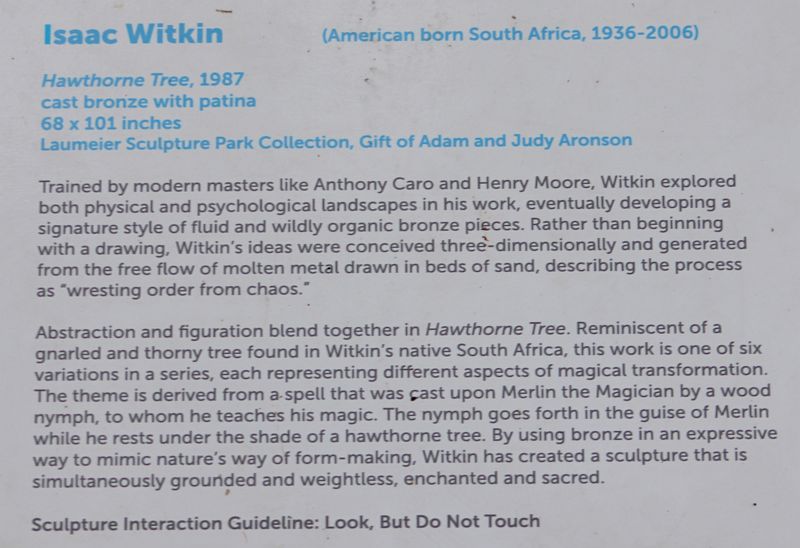
I went by Laumeier Sculpture Park this morning and was underwhelmed.  I walked only the 0.64mi. (ca. 1km) paved “Central Pathway”; and there were only a couple of handfuls of pieces, mostly just geometrical things of steel jutting out seemingly at random.  There are a couple of other trails with, I guess, more, and more interesting, works; but those paths are unpaved, which wouldn’t have worked well with my walker.

There were only a couple of pieces that caught my eye for more than a few seconds, and one of the pictures I took was really bad because I had wiggled the camera when I hit the shutter button.  I have only one picture that I’m willing to admit that I took.

Witkin Piece

Witkin Bio

I need to be a lot more careful about keeping it straight when taking pictures of text.  I should have made the text image bigger, too, so that it would be more legible.  2023-09-11:  I figured out how to rotate the image a bit, and I made it bigger.  There’s still a little distortion because I didn’t have the camera’s focal plane totally parallel to the plaque when I took the picture.

I’m going to need a lot more practice before I burden y’all with any more of this.


Techie Trivia

1.  There’s a switch on the side of each of the two lenses that came with the camera that can be used to turn off autofocus, and I’m happy to turn the focus ring myself.  Also, with autofocus on, the flash magically pops up and wastes energy even in bright sunlight.

2.  I decided not to try to load an image into InfanView directly from the SIM card.  I was a little surprised to find that the SIM card isn’t read-only when it’s out of the camera so, in Windows, I can just copy *.JPG into some directory on my hard drive and del *.JPG on the SIM card when I’m sure that I have all the images on my laptop.  That keeps the SIM card from getting filled up with old images, and normal backup of my hard drive insures that I don’t lose anything.

3.  I decided not to do the “let anybody run it” installation that Marcus suggested.  I just double-click on the icon on my desktop and the program runs fine.  I have administrator privilege, I’m the only person who uses that computer, and I generally keep it with me for physical security.

ChatGPT Fun

On an Amtrak-related e-mail list that I frequent (AllAboardRailDiscussion@groups.io if you care), one of the regulars had a bit of fun with ChatGPT.  I found it amusing; and since ChatGPT has come up on FtB before, I thought I’d repost it here with the author’s permission.

Alan Klein:

Explain how to change a piston in the General Motors 16-567D diesel engine, using the language of the Old Testament

ChatGPT:

In the days of old, when the General Motors 16-567D diesel engine was in need of repair, behold, the changing of a piston required a process as intricate as the weaving of fine linen.  Let me recount to you the steps, as if told in the language of the Old Testament.

1.  Verily, gather the necessary tools and prepare the sacred space.  Anoint your hands with oil, and set the engine in a state of rest upon a foundation of solid ground.

2.  Unfasten the bolts that bind the cylinder head and separate it from the engine block.  Lo, the power of your arm shall overcome the grip of the fasteners, as Samson overcame the Philistines.

3.  Once the cylinder head is removed, thou shalt find the piston nestled within the chamber, encased in rings of steel.  Take heed, for the rings must be removed, as a warrior discards his armor before battle.

4.  Carefully, with the precision of a master craftsman, remove the wrist pin that connects the piston to the connecting rod.  As Moses parted the Red Sea, thou shalt separate the piston from its mighty connection.

5.  Now, with the old piston removed, place the new piston upon the altar of the engine block.  Align the rings upon the piston, ensuring they are in their proper order and seated with care.

6.  Inscribe the wrist pin into its ordained position, uniting the piston with the connecting rod.  Let not the pin falter, for it is the bond that shall withstand the fires of combustion.

7.  Once the piston is in place, return the cylinder head to its rightful position.  Tighten the bolts with the strength of Samson, ensuring a firm and secure union between head and block.

8.  Finally, breathe life into the engine once more.  Ignite the fire within, and may the pistons move with the grace of David‘s harp, producing the melodious symphony of power and efficiency.

Thus, with the guidance of ancient wisdom and a touch of modern knowledge, thou shalt have changed a piston in the General Motors 16-567D diesel engine.  May your endeavors be fruitful, and may the spirit of the Old Testament guide your mechanical pursuits.